Page 1 of 2
How can I save the currency symbol into DB
Posted: Fri Dec 05, 2025 12:19 pm
by unixkd
Hi all and happy weekend.
How can I save ANY currency symbol into a table in database. I notice that:
Function getcurrency()
Local getlist[0], cCurr := space(4)
@ 1,1 dcsay "enter currency symbol" get cCurr
Dcread GUI modal addbuttons
When I enter pound or some other symbol and the get get lost focus the text box change to ?
Thanks
Joe
Re: How can I save the currency symbol into DB
Posted: Mon Dec 08, 2025 5:44 pm
by rdonnay
I need more information. I don't see a problem.
Re: How can I save the currency symbol into DB
Posted: Tue Dec 09, 2025 8:22 am
by unixkd
Hi Roger
I have a setup table with 3 fields namely:
1. Currcode e.g. NGN for Nigeria naira
2. CurrName e.g Naira
3. CurrSymbol e.g N crossed with equal sign.
Now where the problem lies is the symbol. If copy the symbol from charmap.exe of windows and paste it on the dcsay.. get cVarSymbol, the text box change to ? when the text box loses focus. This problem is easy to test. Just run charmap.exe and copy even the eur currency symbol into any get object in your application then press enter key it will change to ? I think it has to do with unicode handling by Xbase++ which deal with ansi. I don't know how DBMS
like ads handle unicodes or problem like this.
Thanks
Joe
Re: How can I save the currency symbol into DB
Posted: Sun Dec 14, 2025 7:04 am
by Auge_Ohr
hi,
which Font do you use ?
Alaska support :
Arial Arial
Arial Fett
Arial Fett Kursiv
Arial Kursiv
Arial Narrow Arial Narrow
Arial Narrow Kursiv
Arial Narrow Fett
Arial Narrow Fett Kursiv
Courier New Courier New
Courier New Fett
Courier New Fett Kursiv
Courier New Kursiv
Verdana Verdana
Verdana Fett
Verdana Kursiv
Verdana Fett Kursiv
your Sign must include in those Fonts else you Will get "?" for unknown Sign.
Re: How can I save the currency symbol into DB
Posted: Mon Dec 15, 2025 11:27 am
by SlavkoDam
Hi Joe,
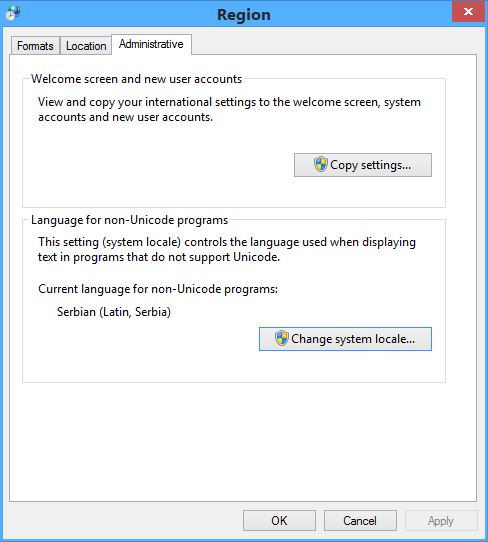
You can try in Windows->Control panel->Region->Change system locale to Nigerian language, and enter into Get field Alt+8358 on the numeric keyboard.
Re: How can I save the currency symbol into DB
Posted: Tue Dec 16, 2025 7:57 am
by unixkd
Thanks Jimmy and Slavkov.
Jimmy do I simply add getfont ... to the
@ dcsay ... get .. of express.
Slavkov please read my post after Roger asked me to provide further details.
Thanks
Joe
Re: How can I save the currency symbol into DB
Posted: Wed Dec 17, 2025 3:47 am
by SlavkoDam
Slavkov please read my post after Roger asked me to provide further details.
I already did, as I always do. You are on the wrong way. You cannot copy/paste Unicode characters into non-Unicode Xbase++ application.
Re: How can I save the currency symbol into DB
Posted: Wed Dec 17, 2025 4:14 am
by unixkd
Slavkov accept my sincere appreciation for your post. Now you really exposed me to the real question that I want to ask.
Is it possible to make an Xbase++ application unicode compliant even using a 3rd party component?
Is DBMS product like ads unicode compactible?
Once more I say thank you.
Joe
Re: How can I save the currency symbol into DB
Posted: Wed Dec 17, 2025 6:48 am
by Auge_Ohr
hi,
unixkd wrote: ↑Wed Dec 17, 2025 4:14 am
Is it possible to make an Xbase++ application unicode compliant even using a 3rd party component?
as i can say it is the same like enhance Xbase++ to 64 Bit !
all API Function must be enhance to use "W" for more Space for Parameter.
but about using other Font : i had used Unicode Office TTF with Xbase++ to show Chinese Sign on German OS.
but using GET i have also to use Chinese OS ( XP Chinese ) to store those Sign into DBF.
before i did that i made a Picture of the Sign and store/show that in German OS
Re: How can I save the currency symbol into DB
Posted: Wed Dec 17, 2025 6:54 am
by SlavkoDam
As I said in my first post, you have to change language for non-Unicode programs using Windows->Control panel->Region->Change system local.
All Unicode characters greater then 255 must be entered into the Get manually, with Alt+Unicode code point (on the numeric keypad). They will be displayed properly. They will be saved into dbf in their hex formats, or you can save them in their hex formats. Dbf and Ads do not support Unicode.
- Capture.JPG (46.62 KiB) Viewed 50381 times